

Outsourcing End-of-Year Tax Form Mailings: A 2026 Guide
A tax mailing is only as reliable as the data behind it. Outsourcing end-of-year tax form mailings can ease year-end pressure, but it also means sensitive information moves through several steps before forms reach recipients.
It’s reasonable to want visibility and control throughout that process. Secure transfer, careful file review, accurate production, and clear communication all matter, especially when your team is coordinating tax work alongside other year-end responsibilities. A well-organized workflow keeps those steps connected.
This 2026 guide explains what to expect when you outsource tax form mailings and how to prepare your files and review process. We’ll cover secure data transfer, file validation, printing and insertion, and the handoff to the postal service, along with the responsibilities your organization and mailing partner manage at each stage. With more than 30 years of experience in business-critical document printing and mailing, Integrity Statements approaches tax form production with a focus on security, precision, and straightforward communication.
Key Takeaways
- Outsourcing end-of-year tax form mailings can bring file preparation, printing, insertion, and postal handoff into one coordinated workflow.
- Understand the steps from secure file transfer and validation through production and mailing, with reporting available when requested.
- Clear responsibilities, review checkpoints, and communication help maintain visibility and control over sensitive recipient data.
- Prepare approved files, assign review owners, and document how your team will resolve questions before production begins.
- Integrity Statements’ tax form mailing workflow combines secure transfer, file review, variable data printing, insertion, and mailing, backed by 30+ Years of Excellence and HIPAA, SOC 1 Type II, and SOC 2 Type II.
Why outsource end-of-year tax form mailings?
Outsourcing end-of-year tax form mailings means handing document production and physical distribution to a specialist, while your organization retains responsibility for the underlying tax information and its obligations. Instead of coordinating each production step separately, your team can follow one managed sequence: prepare and approve recipient data, transfer files securely, review the files, then oversee printing, insertion, and mailing.
This can reduce internal handoffs during a busy period. For example, a team that coordinates data preparation in one department, print production with another, and mailing separately may benefit from defining responsibilities and review checkpoints within one print-and-mail workflow. The value is not simply shifting tasks. It’s making the work easier to plan and monitor.
The decision depends on your organization’s workload, the sensitivity and volume of recipient data, how repeatable the mailing is, and how much visibility your team needs at each stage. Security conversations can also benefit from a shared vocabulary. The NIST Special Publication 800-53 overview introduces security and privacy control concepts. It can inform discussion, but it does not establish that a particular mailing process meets a standard.
Which year-end tax documents may be mailed?
W-2s and 1099s are familiar examples of year-end forms that organizations send to employees, contractors, or other recipients. The specific documents and recipient groups vary, so begin by listing the approved forms that need physical delivery and the number of recipient records involved. For more context on production considerations, see this tax form printing and mailing guide.
What outsourcing does, and does not, transfer
A mailing service can manage printing, inserting forms into envelopes, mailing, and reporting when requested. It does not take over tax advice, tax preparation, electronic filing, or your organization’s filing and recipient obligations. Those responsibilities remain separate from the physical production and delivery of recipient copies. Verify applicable requirements and deadlines using current IRS guidance, and assign clear internal ownership for tax data approval and final files.
Outsourcing is most useful when production is recurring or complex enough to strain existing capacity, while your team still needs defined oversight. Before committing, map the decisions that must stay internal: who approves the data, who resolves file questions, and who signs off before production proceeds. Clear ownership preserves visibility without requiring your staff to coordinate every production task.
Project scope depends on the mailing details, so avoid assuming a standard price or savings. The documents, recipient file, and workflow help define the project. For pricing tailored to your requirements, request a project quote. The goal is a manageable, well-defined process that supports accurate recipient mail while leaving tax preparation and filing decisions with your organization.
How outsourced tax form mailings move from data to delivery
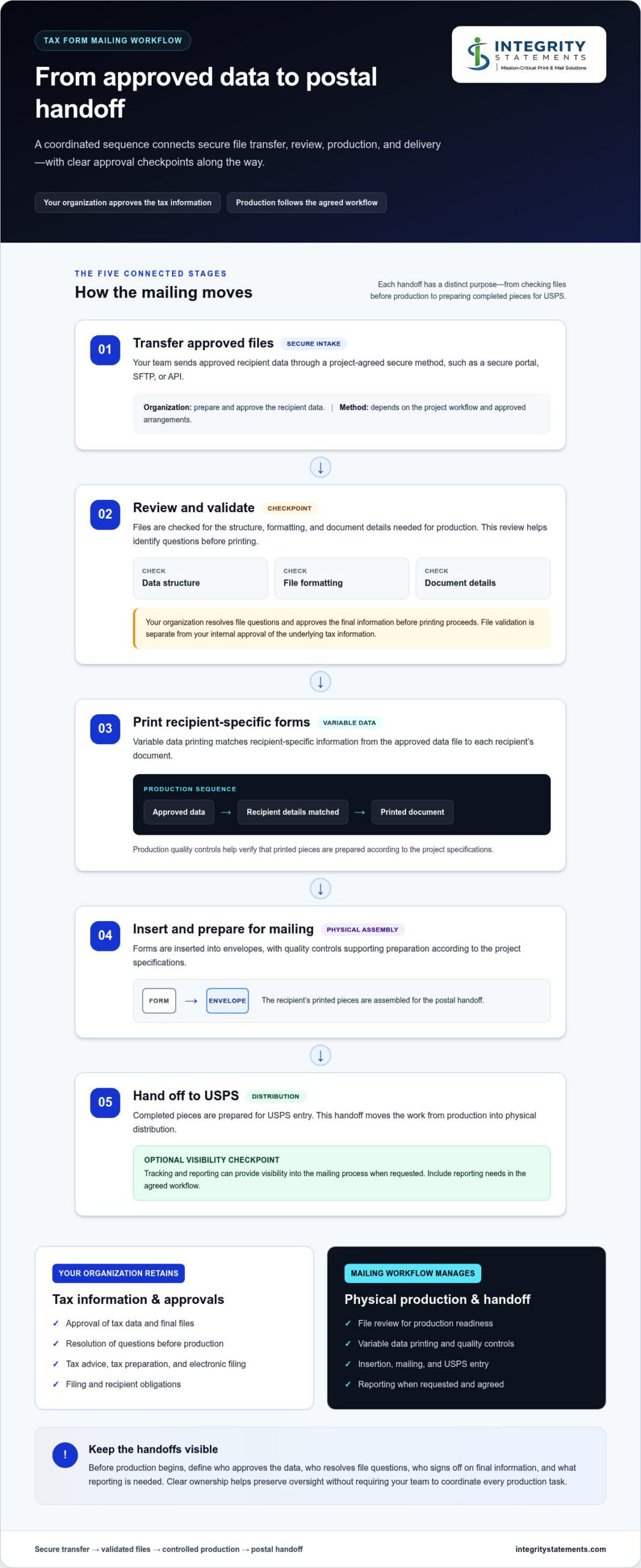
A well-managed mailing follows a sequence of clear handoffs. Your organization supplies approved recipient data through an agreed secure method. The production workflow then reviews the files, prepares the documents, inserts them into envelopes, and sends the mail to USPS. Each checkpoint has a distinct purpose, from catching data or formatting issues before production to confirming that the mailing is ready for postal handoff.
Variable data printing personalizes documents with recipient-specific information from an approved data file.
- Transfer files. Your team sends the approved data using an agreed method, such as a secure portal, SFTP, or API. The method depends on the project workflow and approved arrangements.
- Review and validate. The files are checked for data structure, formatting, and document details needed for production. Your organization should resolve questions and approve the final information before printing proceeds.
- Print and insert. Variable data is matched to each recipient’s document. Production quality controls help verify that printed pieces and envelope contents are prepared according to the project specifications.
- Mail. After printing and insertion, completed pieces are prepared for USPS entry. This handoff moves the work from production into physical distribution.
- Report when requested. Tracking and reporting can provide visibility into the mailing process when requested. Include reporting needs in the agreed workflow.
Secure file transfer and review
Secure file transfer moves approved data into the production workflow through a project-approved method. Once received, review and validation focus on whether the file is structured and formatted for the intended documents, and whether key details are ready for production. These checks are separate from your internal approval of the underlying tax information. For guidance on missing or incorrect taxpayer identification numbers, consult IRS Publication 1586.
Printing, insertion, mailing, and reporting
After file approval, variable data printing connects recipient information to the correct documents. Advanced production equipment and rigorous quality controls support printing and insertion, followed by USPS entry. Integrity Statements’ stated service differentiator is a 24-48 Hour Turnaround. Understand timing and scope within the specific project workflow, rather than treating the turnaround as a guarantee for every mailing. Tracking and reporting are available on request.
Clear ownership at each handoff helps your team know when to supply data, answer questions, or approve files. For a closer look at how a managed workflow supports tax form production and mailing, explore Integrity Statements’ tax form mailing services.
How to assess security, accuracy, and control before outsourcing
Outsourcing can preserve visibility over sensitive tax mailings when responsibilities, approvals, and checkpoints are clear. Look beyond a general assurance of security. Understand how files enter the workflow, who reviews them, when your team approves production, and what information is available after mailing.
Integrity Statements supports secure file transfer through a portal, SFTP, API, or other approved methods, with file review and validation as part of the workflow. Its stated credentials include HIPAA, SOC 1 Type II, and SOC 2 Type II. Credentials and process descriptions provide useful context, but they don’t replace agreement on project-specific roles, review points, and communication.
| Area | What to clarify | Integrity Statements’ approach |
|---|---|---|
| Secure transfer | Which approved method will carry the files into production, and who is responsible for sending them? | Secure file transfer via portal, SFTP, API, or other approved methods. |
| File review | How are data, formatting, and document details reviewed, and who resolves questions? | File review and validation are part of the stated workflow, with dedicated support for project communication. |
| Production controls | What checks and approval points are agreed before printing and insertion? | Production is coordinated with file review and validation. Define project-specific responsibilities clearly. |
| Communication | Who is the day-to-day contact, and how are questions or status updates handled? | Dedicated support and straightforward communication help clarify handoffs. |
| Reporting | What delivery visibility does your team need, and should reporting be requested? | Tracking and reporting are available on request. |
Documented checkpoints give both teams a shared record of what has been reviewed, approved, and handed off. This makes oversight of sensitive mailings clearer.
Questions that reveal how sensitive files are handled
Before a project begins, align on the approved transfer method and how the file will be reviewed once received. Confirm which formatting and document details are part of validation, who at your organization approves the final information, and how questions will be routed. Integrity Statements’ dedicated support helps clarify those handoffs, while the specific transfer method and project controls are defined for the project.
For form specifications, consult IRS Publication 1179, which covers general rules and specifications for substitute tax forms. It can inform your review, while your organization remains responsible for approving the information and applicable requirements.
How accuracy and delivery visibility fit together
Document-level checks happen during file review and production. USPS preparation and mailing come later. Variable data printing places recipient-specific information on each document, so accuracy depends on approved source data and careful review before production. Tracking and reporting can be requested for mailed items, providing visibility distinct from checks on document content. For more detail on delivery visibility, the secure mail tracking guide discusses tracking for business mailings.
With outsourcing end-of-year tax form mailings, the aim is not to surrender oversight. It’s to establish a clear, reviewable process that identifies who owns each decision and what information supports the next handoff.
How to prepare your organization for an outsourced tax mailing
A smooth mailing starts before any file is transferred. For outsourcing end-of-year tax form mailings, preparation means agreeing on ownership, assembling approved recipient information, and making room for review and corrections. These steps help prevent avoidable delays, especially when tax, HR, finance, and communications teams all contribute to the mailing.
Organize files, ownership, and approvals
Name one internal owner for the project and assign clear responsibility for data preparation, final file approval, and communication with the mailing team. Identify in advance the people who can answer data or formatting questions, rather than finding them after a review flags an issue. Prepare recipient and document data in the format agreed for the project, and define who approves changes before production starts.
- Assign owners. Identify who prepares the data, approves the file, and serves as the main project contact.
- Prepare the approved source. Confirm that the file contains the recipient and document information intended for this mailing, and avoid circulating competing versions.
- Set review responsibilities. Decide who checks formatting and document details, who resolves questions, and who gives final approval.
- Agree on communication. Establish how questions, corrections, and status updates will be routed so decisions reach the right person promptly.
A written approval path is particularly useful when someone other than the data preparer must verify recipient details or document layout. Record the approved file version and the person authorizing production. That record clarifies which information is current and helps the team avoid reintroducing an earlier draft after corrections.
Build a schedule around verified obligations
Start with current IRS and applicable state requirements, then work backward to set your organization’s internal readiness dates. Official filing deadlines and recipient delivery obligations are separate from your own target dates for preparing data, reviewing output, and approving the mailing. Verify requirements against authoritative sources before setting the schedule, since obligations can vary by form and recipient situation.
Build the project calendar around the actual workflow, rather than assuming one universal production lead time. Allow space for internal data preparation, file questions, review, corrections, approval, production, and postal handling. Name an owner for each milestone and note what must be complete before the next step can begin. If a review uncovers an issue, a clear escalation contact helps the team address it without losing track of approvals.
- Set internal target dates for data preparation and transfer.
- Reserve review time for formatting and document details, plus any needed corrections.
- Schedule final approval before production and account for postal handling after mailing.
- Recheck current requirements and adjust the calendar if the form or recipient obligations call for it.
Once your owners, approved files, and schedule are in place, you can scope the work with a clearer understanding of the mailing. Request a project quote to discuss your tax form printing and mailing needs.
What to expect from Integrity Statements’ tax form mailing service
Integrity Statements brings production and mailing steps together in a managed workflow, so your organization can follow the work from approved file to postal handoff. For teams considering outsourcing end-of-year tax form mailings, that means a clear process for transferring data, reviewing files, producing recipient-specific documents, and preparing the mailing.
A managed workflow with straightforward communication
The sequence begins with secure file transfer through a portal, SFTP, API, or another approved method. File review and validation follow, giving the project a checkpoint for data structure, formatting, and document details before production. Variable data printing then places recipient-specific information on forms, followed by insertion and mailing. Tracking and reporting are available on request.
These steps support a more visible process, but your team still needs to approve the information and resolve questions. Integrity Statements’ dedicated support helps clarify handoffs and keep communication straightforward as the project moves through production. The aim is an easy-to-work-with process where your organization understands what is needed at each stage.
Integrity Statements brings 30+ Years of Excellence in business-critical document printing and mailing. Its stated credentials include HIPAA, SOC 1 Type II, and SOC 2 Type II. USPS postal expertise supports the mailing handoff, while the 24-48 Hour Turnaround is a stated service differentiator. Understand timing and project scope in the context of the specific mailing.
Strategically Located in Central Texas, Integrity Statements serves organizations nationwide. Whether your organization is coordinating a recurring mailing or planning a year-end project, the same core process connects secure transfer, file review, variable data printing, insertion, mailing, and requested reporting. Your team remains involved in approving the data and addressing questions, while production moves through a defined workflow.
Request a quote for your year-end mailing
A quote helps tailor the mailing service to your project requirements. Details such as the documents being mailed, recipient file readiness, and your review and communication needs help frame the scope. Preparing those details in advance can make the discussion more focused and clarify how the workflow will fit your organization’s approvals and schedule.
For your year-end tax form printing and mailing needs, Request a Quote.
Make next year’s mailing easier to plan
Use this year’s project to establish a repeatable starting point for the next cycle. Once the mailing is complete, record what helped the work stay organized, where approvals took longer than expected, and which questions came up during file preparation. Keep those notes with your annual planning materials so the next team can begin with practical lessons, not a blank page.
That review can make outsourcing end-of-year tax form mailings more predictable over time. It also gives your organization a chance to refine its internal calendar and clarify ownership as responsibilities or recipient groups change. Keep tax decisions and filing obligations with the appropriate internal owners, while treating the print-and-mail workflow as a distinct project to plan and review.
If you’re preparing for an upcoming mailing, outline your project needs and discuss how the workflow can fit your schedule. Integrity Statements brings 30+ Years of Excellence, HIPAA and SOC compliance, including SOC 1 Type II and SOC 2 Type II, and is Strategically Located in Central Texas and Serving Organizations Nationwide. Its stated 24-48 Hour Turnaround can also inform project planning.
Start planning your tax form mailing with a clear path forward.
Frequently Asked Questions
Does outsourcing end-of-year tax form mailings include filing forms with the IRS?
No. Outsourced print-and-mail services handle physical document production and distribution, not tax preparation or filing forms with the IRS. Your organization remains responsible for determining and meeting its filing and recipient obligations. For example, a mailing partner may prepare recipient copies for delivery, while your tax team separately manages required submissions. Check current IRS guidance for the forms and filing methods relevant to your organization.
When should an organization start planning its year-end tax form mailing?
Start once you can identify the forms, recipient groups, internal approvers, and applicable deadlines. There isn’t one planning date that fits every organization, since requirements and project workflows vary. Work backward from verified recipient and filing obligations, allowing your team time to assemble data, resolve questions, review documents, and approve production. Confirm current requirements with authoritative sources before setting the calendar, and avoid treating a production turnaround as the full project timeline.
What information should a business prepare before outsourcing tax form mailings?
Prepare the final recipient data, the document types to be mailed, and any project-specific formatting instructions. Also identify who can approve the information and who can answer questions about missing, inconsistent, or updated records. For example, if an employee address changes after a data file is prepared, your team should know who verifies the correction and authorizes the updated record. Use the agreed file format and avoid sending unapproved drafts.
Can outsourced tax form mailings include both W-2 and 1099 documents?
Yes, a tax form mailing project can include W-2 and 1099 documents, depending on the organization’s needs and recipient groups. These forms may require distinct recipient data, layouts, or handling instructions, so identify each document type clearly in the project materials. Separate and label approved data appropriately, and have the responsible internal owner verify which recipients receive which forms before authorizing production.
How can an organization review a mailed tax form before it goes out?
Set an internal review checkpoint before production begins. Assign an authorized reviewer to verify recipient information, document details, and formatting against the organization’s approved records, then communicate corrections through the designated project contact. Agree on how questions will be handled and who gives final approval. This review helps catch issues before mailing, but it doesn’t replace your organization’s responsibility to confirm the tax information is correct.
Can a business request tracking or reporting for mailed tax forms?
Yes. Tracking and reporting for mailed items are available on request, so include that need when defining the project workflow. Clarify what information your team needs and who should receive it, such as a project owner responsible for monitoring delivery information. Reporting can support visibility into the mailing process, but it doesn’t confirm that the tax form’s contents are accurate or satisfy separate filing obligations.
How does secure file transfer work for outsourced tax form mailings?
Your organization sends the approved file using a method agreed for the project, such as a secure portal, SFTP, API, or another approved method. Before transfer, confirm the file version, the person authorized to send it, and the project contact for questions. Use the agreed channel rather than sending sensitive recipient data through an unapproved route, and keep internal approval records with your project documentation.


