

Houston Medical Billing Print and Mail Envelope Options
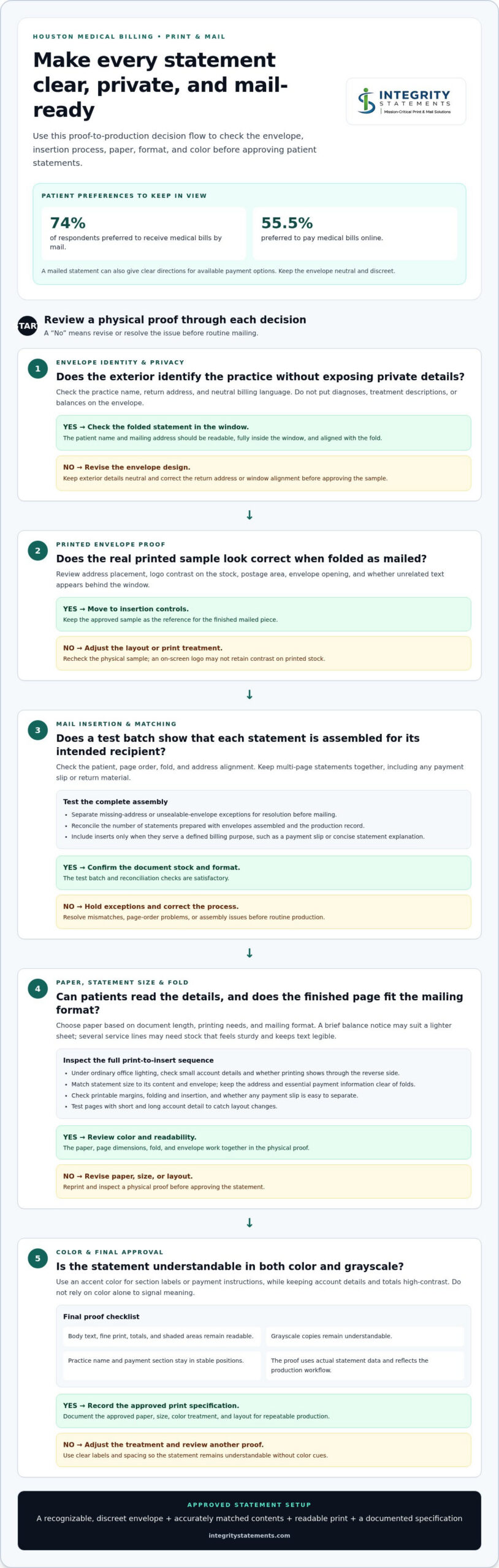
74% of respondents preferred to receive medical bills by mail, while 55.5% preferred to pay them online. For Houston medical billing print and mail, assess whether a vendor can produce clear, branded statements, insert them accurately, and support the paper, envelope size, and color choices that fit your workflow. The right setup connects a dependable mailed bill with a convenient way to pay.
Choosing a vendor means looking beyond the printed page. Envelope branding, insertion accuracy, print readability, and secure handling of billing information all affect how a patient receives and responds to a statement.
This guide explains what to compare in patient statement services, from envelope and mail-insertion options to paper, format, and color printing. You’ll also learn how production works, what can affect service costs, and how to choose a print-and-mail partner that fits your practice’s communication needs.
Key Takeaways
- Compare envelope branding and insertion controls to see how each vendor keeps statements clear, correctly assembled, and ready for mailing.
- Choose paper, statement dimensions, and color printing based on readability, document content, and your mailing workflow.
- Assess providers by how their production process, communication, and safeguards fit the needs of sensitive patient billing.
- Plan a provider transition around data preparation, sample review, workflow testing, and a coordinated changeover to help maintain continuity.
- Consider Custom Print & Mail when you need a partner to manage printed communications through a tailored print-and-mail process.
Branded envelopes and mail insertion
A branded envelope helps patients recognize a statement before opening it. Keep the return address, practice name, and mailing address consistent with the statement inside. For example, a Houston clinic with several locations can maintain one recognizable identity while using the correct billing return address for each account.
Design the envelope so it is easy to identify without exposing private details. Use the exterior for the practice name and neutral billing language, not diagnoses, treatment descriptions, or balances. The patient’s name and mailing address should remain readable through the window when the statement is folded. Align the fold, address, and window.
Before approving an envelope, review a physical sample with the statement folded as it will be mailed. Confirm that the address sits fully inside the window and that no unrelated text appears behind it. Check the return address, logo, postage area, and envelope opening. A logo that looks clear on screen may lose contrast on the printed stock.
Mail insertion is the controlled process of matching each statement with its envelope and accompanying pages. A mismatch can send one patient’s billing information to another address. A practical workflow starts with a test batch, followed by checks of the patient, page order, fold, and address alignment before routine production.
- Match every statement to its intended envelope using the patient record or another approved production identifier.
- Keep multi-page statements together and in the correct order, including any payment slip or return material.
- Separate exceptions, such as a missing address or an envelope that cannot be sealed properly, for resolution before mailing.
- Reconcile the number of statements prepared with the number of envelopes assembled and the production record.
Include inserts only when they support a clear billing task. A payment slip, remittance envelope, or concise explanation of statement sections can help patients understand what to do next. Extra pages add handling steps, so each insert should serve a defined purpose and match the account receiving it.
Build a repeatable approval routine around real examples. Review a standard statement, a multi-page account, and an account with an insert. Confirm that folds do not hide payment details and the envelope closes securely. These checks make branding, document handling, and mailing accuracy part of one consistent process.
Patients use different payment methods. A Consumer Action survey found that 55.5% preferred to pay medical bills online. A statement can therefore pair a mailed bill with clear directions for available payment options, while the envelope remains neutral and discreet.
Paper, size, and color print options
Paper affects how patients read, handle, and store statements. A clinic sending a single-page balance notice may prefer a lighter sheet that folds easily. A statement with several service lines may need stock that feels sturdy and keeps text legible during handling. Choose based on document length, printing needs, and mailing format, not appearance alone.
Compare paper samples under ordinary office lighting before approving production. Check whether small account details remain clear, the sheet feeds cleanly through folding and insertion, and printed areas show through the reverse side. Dense billing details on thin paper, for example, can be harder to review if text or graphics show through.
Choose statement size based on the information patients need and how the document will be folded. A compact format can suit a brief balance notice, while a longer statement may need room for itemized charges, payment instructions, and account details. Match the finished page to its envelope so the fold does not conceal the patient’s address or essential payment information.
Use a sample statement to test the full sequence: print, fold, insert, and review. Confirm that margins fit the printable area, text stays clear of fold lines, and any payment slip is easy to separate. A statement that looks balanced on screen can shift in print, so inspect a physical proof before approving the layout.
Color can create visual hierarchy without making a statement difficult to read. Use a consistent accent color for section labels or payment instructions, while keeping account details and totals high-contrast. A colored “Amount due” heading, for example, can stand out from explanatory text, but color should not be the only signal for a required action. Clear labels and spacing should convey the meaning too.
- Review body text, fine print, totals, and shaded areas on a printed sample.
- Check that grayscale copies remain understandable if patients print or copy statements.
- Keep recurring elements, such as the practice name and payment section, in stable positions.
- Test pages with short and long account detail to catch layout changes.
Ask for a proof that reflects the actual statement data and production workflow. Review readability, folding, and envelope fit together, rather than as separate design choices. This practical check shows whether the paper, page dimensions, and color treatment work as one patient-facing document.
For a Houston practice, the right specification supports accurate production and patient understanding. Record the approved paper, size, color treatment, and layout in a repeatable print specification. This gives future statement updates a clear starting point and reduces avoidable design variation.
Houston medical billing print and mail service providers
Compare providers by the complete statement workflow, not printing alone. A Houston practice may need recurring statements, account notices, payment slips, and mailing preparation handled as one coordinated job. Map each step from billing-file receipt through completed mail, then identify who handles production questions and corrections.
Start with the service scope. Some arrangements focus on printed documents, while others coordinate printing, inserting, and mailing. A clinic sending a statement with a detachable remittance section, for example, needs a workflow that keeps the section with the correct account. Define the required output before comparing proposals.
Ask how production files are received and status information is reported. A useful process identifies the accepted file format, transfer method, approval contact, and handling of rejected records. If an address field is incomplete, the practice should know how the record is separated and its status reported. These details shape day-to-day coordination.
Review quality-control steps using representative samples: a one-page statement, a multi-page account, and a document with a payment slip. Check that the practice name, patient address, balance, and page order match the approved file. Sample reviews can reveal layout or workflow problems before routine production begins.
Compare reporting as well as finished pieces. A production summary can help billing staff reconcile the records submitted with those processed and identify exceptions. Review a sample report to see how it distinguishes completed items from records needing attention. Clear reporting makes follow-up more controlled than informal email updates.
Use a consistent evaluation checklist for each provider:
- List every output, such as statements, inserts, and return materials.
- Document file transfer, proof approval, production updates, and exception handling.
- Review a sample containing different page counts and account details.
- Compare reporting, communication roles, and the steps for correcting a rejected record.
- Confirm how changes to statement layouts or mailing instructions enter the workflow.
Consider how the arrangement fits your billing team’s workload. A practice that prepares files internally may prioritize dependable file intake and production updates. A clinic seeking broader coordination may value one workflow covering document preparation through mailing. The deciding factors are the tasks your staff handles now and the handoffs that cause delays or rework.
Ask each provider to describe the same example from start to finish. Trace a multi-page statement with a payment slip from file submission to mailing completion. Compare the steps, approval points, exception reporting, and staff responsibilities. This makes proposals easier to evaluate based on process rather than broad claims.
For Houston practices, a well-matched provider should fit the statement format, file workflow, and internal review process. Document these requirements before choosing a service. The written workflow then gives billing staff a practical reference for routine production and future changes.
A Good Faith Estimate is a required notification to uninsured and self-pay patients that outlines reasonably expected charges for a medical item or service, such as an imaging study. Include it when defining the relevant document workflow.
Risks and security safeguards for outsourced medical billing mail
Outsourcing a statement run creates handoffs where information or documents can go astray. A file sent to the wrong destination, for example, may expose patient billing details before printing begins. Map each stage from file preparation to mailing and assign a clear owner to every transfer.
Start with data access. Limit production files to the fields needed for the statement, such as the patient’s name, mailing address, account details, and balance. Use named user accounts instead of shared logins, and remove access when a staff member changes roles. A written access process makes responsibilities easier to review.
File transfer requires the same care. Establish an approved transfer channel, identify authorized senders and recipients, and define how staff confirm receipt. A billing team can, for example, reconcile a file’s record count against a production receipt before approving the next step. Avoid sending patient files through personal email or unapproved storage.
Production controls should address misprints and leftover materials. A statement placed in the wrong envelope can disclose another person’s information. Establish procedures for separating spoiled pages, reprints, and unused output from active mail. Document who handles each exception and how the production record reflects its resolution.
- Use a sample review to compare patient identifiers and statement details against the source file.
- Reconcile submitted records, completed statements, exceptions, and mailed pieces.
- Restrict access to printed output and work areas to authorized personnel.
- Define how misdirected mail, suspected exposure, or missing production files are reported and escalated.
Physical handling matters after printing. Keep unprocessed statements and completed mail in controlled work areas, not shared reception spaces. A batch awaiting postage, for instance, should remain secured until handoff. Set procedures for visitors, pickup, and end-of-shift storage, then document who completed each handoff.
Retention and disposal also need defined steps. Decide how long production files, proof copies, and spoiled pages should remain available for business needs. Specify secure deletion or destruction methods and assign responsibility. A sample statement used for layout approval should not remain in an open folder after review.
Before production begins, document the safeguards in the workflow and test them with a controlled sample. Include a standard statement, a multi-page account, and a correction scenario. Record who approves the proof, how exceptions are handled, and which production records are retained. These steps make security expectations visible throughout outsourced billing mail.
How to switch medical billing print and mail providers in Houston
Changing providers affects billing files, statement layouts, approvals, and mailing routines. Treat the transition as a controlled project, with a named owner for each task. The billing manager, for example, can coordinate file testing while finance approves statement balances and payment instructions.
Begin by documenting the current workflow. Record file formats, transfer methods, statement versions, inserts, mailing instructions, and exception procedures. Include a standard account and a multi-page account as test cases. This inventory gives the incoming provider a clear picture of required outputs and helps your team identify steps to update.
Next, assign responsibilities and agree on milestones before transferring production data. The written plan should identify who supplies files, reviews proofs, approves release, and handles rejected records. Set a target date for each task based on your billing cycle, contract terms, and internal review capacity. Do not schedule the changeover before testing is complete.
- Prepare the specifications. Gather approved statement samples, envelope details, inserts, address rules, and mailing instructions.
- Map the data handoff. Document the file format, authorized sender, transfer channel, receipt confirmation, and exception process.
- Review proofs. Compare patient identifiers, balances, page order, payment details, and layout against source records.
- Run a controlled test. Use representative records, including a multi-page statement and any payment materials.
- Approve the cutover. Confirm responsibilities, production status reporting, and the first live billing cycle.
Keep the current process available until the new workflow passes its agreed checks. For a billing cycle near the changeover, establish which provider handles each file and which team approves each mailing. This prevents duplicate statement runs or gaps between production batches. Record final instructions in one shared transition document.
During testing, compare submitted records with completed output and investigate every exception. Resolve missing addresses, mismatched accounts, or incorrect page orders before live production. Have billing staff review sample statements for accurate balances and payment details, while operations staff checks file receipt and reporting.
After the first live mailing, review the production report with the people responsible for billing and operations. Reconcile submitted records, completed pieces, and exceptions, then assign follow-up tasks. This helps the team distinguish a one-time correction from a workflow issue that needs a lasting change.
A clear transition plan protects continuity while your practice moves billing mail to a new workflow. If you’re planning a change, discuss your billing print-and-mail requirements and the production steps involved.
Integrity Statements: Custom Print & Mail
Integrity Statements offers Custom Print & Mail for organizations seeking a coordinated approach to printed communications. For a medical practice, this can be a natural next step when statement production needs to align with established formats, billing workflows, and mailing requirements. Share the document types, layout preferences, and production steps your team uses to define the work. A clear process connects the details discussed in this guide, from patient-facing print choices to the handoffs involved in preparing mail. If you’re considering a more coordinated print-and-mail workflow for your practice, contact Integrity Statements to discuss your needs.
Set Your Next Billing Cycle Up for Success
The next step is to turn your requirements into a clear production plan. Define the statement format, mailing workflow, approval steps, and safeguards your team needs. This gives your practice a practical basis for evaluating Houston medical billing print and mail and planning a transition with fewer workflow surprises.
Integrity Statements offers Statement Printing and Mailing, Invoice and Billing Printing and Mailing, and Healthcare Communications Printing and Mailing. These services can support your practice in preparing and sending patient billing communications as part of a coordinated print-and-mail process.
Start a conversation with your priorities, such as statement layout, mailing requirements, or the handoffs your current process needs to improve. Contact Integrity Statements to discuss your needs and explore a suitable next step for your billing communications.
A clear plan helps your team move forward with confidence and keep patient statements organized from production through mailing.
Frequently Asked Questions
What to look for in patient statement vendors?
Look for a vendor whose workflow fits your billing system, statement formats, and patient communication needs. A Houston medical billing print and mail vendor should explain how billing data becomes a finished statement and how exceptions are communicated. If your practice uses different statement templates for separate departments, for example, confirm that the production workflow can distinguish those files accurately. Also review how responsibilities, revisions, and output records are documented.


