
Secure Print and Mail for Accounting Firms in Dallas
What if the greatest risk in a client tax mailing isn’t the printer, but a handoff between file approval, production, insertion, and delivery? Sensitive financial information passes through multiple steps, and a mailing error or delay can affect client service and firm operations. Assessing secure print and mail for accounting firms Dallas means looking beyond the finished pages to how the full workflow is managed.
It’s reasonable to reduce manual printing and mailing work without losing oversight of important client communications. A connected print-and-mail workflow brings document production and mailing together, while clear responsibilities show where information moves and who is accountable at each stage. This guide explains how to evaluate file handoffs, approvals, printing, insertion, mailing, and delivery. For Dallas-area accounting operations, a deliberate review can help your firm improve efficiency while keeping accuracy, deadlines, and client information protection in view.
Key Takeaways
- Assess secure print and mail for accounting firms Dallas across the full workflow, from approved file handoff through postal delivery.
- Map each production stage and review how recipient-data matching helps reduce misdirected statements, invoices, and tax documents.
- Compare services by document scope, handoffs, quality checks, accountability, and fit with your firm’s existing workflow.
- Use a practical checklist to align file approvals, recipient data, inserts, review responsibilities, and mailing schedules with firm deadlines.
- Integrity Statements brings recurring statements, invoices, tax forms, and regulatory mail into a managed print-and-mail workflow.
Secure print and mail for Dallas accounting firms: what needs protection?
Accounting communications carry more than a firm’s name and return address. Statements, invoices, tax forms, and regulatory notices may contain financial and personal details that need to reach the intended recipient accurately. Secure print and mail for accounting firms Dallas is a managed process, not simply a printing task. The aim is to move approved documents through production and postal handoff with clear handling steps, accuracy checks, and defined responsibility.
Which accounting communications commonly go to print and mail?
Recurring statements and invoices connect directly to client accounts and billing. Tax forms and regulatory notices serve different purposes, but also depend on correct document-to-recipient matching and coordination with firm-defined deadlines. These transactional communications differ from promotional direct mail: they deliver account, tax, or business information to a specific recipient.
The workflow varies with the number of documents, the degree of personalization, and the timing of each mailing. A recurring billing cycle may use a consistent file format, while a tax-document mailing may require different inserts, review steps, or scheduling. For Dallas-area firms serving clients across Texas, organized production and mailing can reduce avoidable manual work and keep recurring communications on track.
What does secure document handling mean in practice?
Secure transactional mail is the controlled end-to-end handling of approved files, from transfer and production checks through accurate insertion and postal handoff. This definition focuses on the workflow, rather than on a printer or a broad promise of security. General data security principles include protecting information from unauthorized access, alteration, or loss. Applied to print and mail, that means examining each point where files and documents are handled.
Map the process and identify who is responsible at each stage. Define:
- File handoff: Which approved file is used, and how it is transferred for production.
- Recipient matching: How document records, addresses, and required inserts are aligned before mailing.
- Production checks: Which review steps help catch missing pages, incorrect versions, or mismatched materials.
- Accountability: Who owns approvals, handles exceptions, and confirms the mailing has moved to postal handoff.
Clear responsibilities and review points make the workflow easier to assess. For example, a firm can specify who approves a replacement file and what should happen if address information is incomplete. Printing equipment matters, but it cannot provide oversight on its own. Accuracy also depends on data quality, controlled handoffs, careful production, and accountable delivery.
How a secure accounting mail workflow moves from file to delivery
A reliable mailing workflow makes each handoff clear. For secure print and mail for accounting firms Dallas, that means knowing which file is approved, how documents are matched to recipients, and who reviews the job before mail leaves production. Use the steps below to map a recurring statement, invoice, or tax-form mailing.
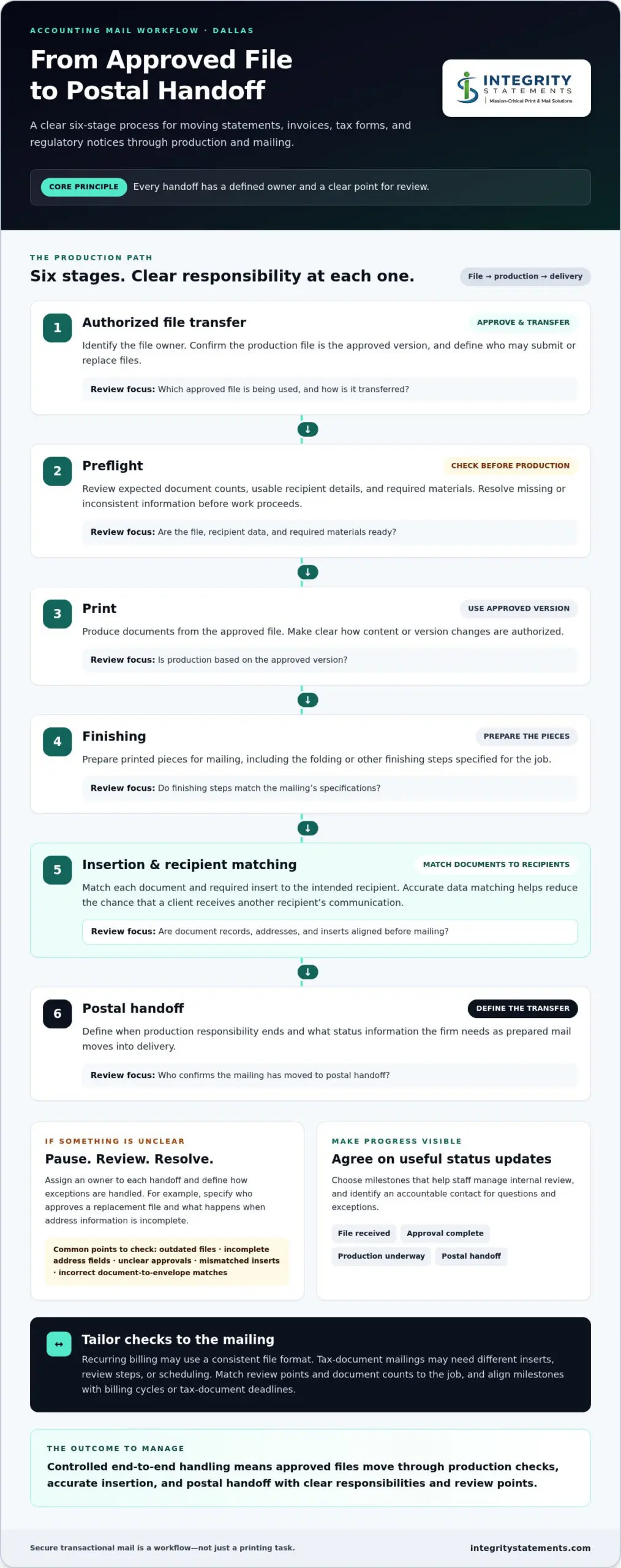
From approved file to postal handoff, each production stage should have a defined owner and a clear point for review.
- 1. Authorized file transfer: Identify the file owner and confirm that the version sent for production has been approved. Define who can submit or replace files.
- 2. Preflight: Review the file for expected document counts, usable recipient details, and required materials. Resolve missing or inconsistent information before production proceeds.
- 3. Print: Produce documents from the approved version. Make clear how changes to content or versions are authorized.
- 4. Finishing: Prepare printed pieces for mailing, including the folding or other finishing steps specified for the job.
- 5. Insertion: Match documents and inserts to the intended recipient. Accurate data matching helps reduce the chance that a client receives another recipient’s communication.
- 6. Postal handoff: Define when production responsibility ends and what status information the firm needs as prepared mail moves into delivery.
Where can errors or exposure occur in the process?
Errors can start before printing: an outdated file, incomplete address fields, or an unclear approval can put the workflow on the wrong track. Later, a mismatched insert or an incorrect document-to-envelope match can undermine an otherwise accurate mailing. Reduce ambiguity by assigning an owner to each handoff and defining how exceptions are paused, reviewed, and resolved.
Reconciliation supports these checks. For example, a firm can specify which document counts or job details should be compared at agreed review points. The checks should match the mailing rather than rely on a broad security claim. If a workflow involves protected health information, consult HHS guidance on the HIPAA Privacy Rule to understand relevant requirements for the circumstances.
What should firms expect from workflow visibility?
Define which status updates will help staff manage internal review, such as file received, approval complete, production underway, or postal handoff. Identify an accountable contact for questions and exceptions. Align those milestones with billing cycles or tax-document deadlines so staff can plan reviews without treating the mailing schedule as a substitute for firm approval.
For more context on delivery visibility, see the existing guide to secure mail tracking. To understand how document production and mailing fit together, explore transactional print and mail services.
How Dallas accounting firms can compare secure print-and-mail services
Outsourcing changes custody and workflow, but your firm still needs to understand who handles each handoff, what checks take place, and how questions or exceptions are addressed. For secure print and mail for accounting firms Dallas, compare documented processes and supporting evidence rather than relying on broad statements such as “secure” or “fully protected.”
Focus the comparison on the work your firm actually sends: recurring statements and invoices, tax forms, and regulatory mail. Use the same criteria for each workflow to make differences in scope, oversight, and operational fit easier to see.
| Comparison area | What to assess |
|---|---|
| Document scope | Can the workflow accommodate the firm’s document types, recurring schedules, personalization, and required inserts? |
| File handoffs | How does an approved file enter production, who owns each transfer, and how are file replacements or exceptions handled? |
| Quality checks | What review points address recipient data, document matching, production accuracy, and job reconciliation? |
| Accountability | Are responsibilities clear for approvals, questions, exception handling, and postal handoff? |
| Workflow fit | Does the process align with the firm’s volume, deadlines, internal review steps, and available staff capacity? |
Which security and accuracy questions should lead the comparison?
Start with the file path: how is the approved version identified, who can submit it, and who takes responsibility at each handoff? Then ask how recipient data is matched to documents and how incomplete addresses, unexpected counts, or mismatches are handled. These questions help clarify how the process works and where responsibility sits.
Accounting firms can also review the FTC’s overview of the Gramm-Leach-Bliley Act (GLBA) when considering their information-protection responsibilities. Evaluate claims about certifications or specific technical controls against current supporting evidence. A general assurance is not a substitute for a clear explanation of workflow and accountability.
How can a firm judge operational fit?
Compare expected volumes and document types with approval requirements and the staff time available to prepare, review, and release each mailing. A firm may want related statement, invoice, and tax-form workflows to fit within one managed production relationship while retaining its own review and authorization steps.
Dallas-area firms can also consider how recurring mail supports communication with clients and business contacts across Texas, especially when billing cycles or tax-document deadlines shape the calendar. Integrity Statements provides transactional printing and mailing for statements, invoices, tax forms, and regulatory mail. Operational fit comes down to whether the workflow connects those needs while keeping responsibilities clear.
Dallas accounting mail checklist: prepare files, approvals, and deadlines
A consistent preparation routine helps accounting teams move a mailing into production with fewer unresolved questions. For secure print and mail for accounting firms Dallas, define who owns the documents, which version is approved, and when the firm authorizes release. Keep the checklist with the recurring billing or tax-document calendar so staff can follow the same sequence each cycle.
What should the accounting team prepare before a mailing cycle?
Before sending files for production, assign an owner and gather the instructions needed to prepare the job. For an invoice cycle, confirm the approved invoice version, recipient list, personalization rules, and any enclosure. Share only the information needed for the mailing. When live client data is not necessary, use sample files or masked examples to explain layout and instructions.
- Document owner: Name the person responsible for the final content and production instructions.
- Approved file: Identify the current version and how the firm will communicate an authorized replacement.
- Recipient data: Confirm the list and required address fields, along with the rules for matching records to documents.
- Inserts and quantities: Specify enclosures, expected counts, and any differences among recipient groups.
- Review and release: State who reviews the materials, how approval is recorded internally, and who authorizes production to proceed.
- Schedule and exceptions: Set the requested mailing schedule and instructions for incomplete data or other issues that need review.
Make the approval owner explicit. Work backward from firm-defined billing dates or tax-document deadlines, leaving time for internal review and corrections. A production calendar should not replace the firm’s decision about when documents are final and cleared for release.
How should firms handle tax forms and related mail?
Printing and mailing support covers document production and distribution, not tax preparation or advice about filing obligations. Requirements and deadlines can depend on the form, recipient, and circumstances. Consult current IRS instructions for the specific form and verify the applicable schedule before setting production dates. Assess regulatory requirements in context rather than treating them as identical across every mailing.
For a deeper look at this document category, use the existing tax form printing and mailing guide as a companion to the checklist. Clear files, instructions, and firm approvals make the handoff more orderly while keeping tax decisions with the accounting team.
To simplify recurring document production and mailing, explore accounting print-and-mail support for statements, invoices, tax forms, and regulatory mail.
Outsource secure print and mail with an experienced transactional-mail partner
Accounting firms can reduce the internal work of printing, assembling, and mailing recurring documents by bringing those tasks into a managed print-and-mail workflow. Outsourcing changes who handles production, so clear responsibilities and firm oversight remain important. A well-defined process lets the accounting team retain its approval role while shifting routine production tasks to a transactional-mail partner.
Integrity Statements provides business-critical printing and mailing for statements, invoices, tax forms, regulatory mail, and customer notices. For firms managing several recurring communications, one service relationship can connect document production and mailing needs without treating every document type as the same job. The workflow can be shaped around the firm’s communications and review requirements.
Why accounting firms use a focused print-and-mail service
Statements, billing documents, tax forms, and regulatory notices each have distinct content and timing considerations. A transactional-mail focus keeps attention on accurate document production and distribution rather than promotional messaging. Outsourcing can reduce the time staff spend on print preparation and mailing tasks, while agreed approval steps keep the firm involved in authorizing documents and defining responsibilities. The firm still needs to oversee its information and workflow.
For firms evaluating secure print and mail for accounting firms Dallas, the goal is a practical balance: less manual production work, clear ownership, and a process that fits recurring business communications. Security and delivery outcomes depend on the workflow and controls in place, so evaluate the actual process rather than treating general assurances as guarantees.
What to share when discussing a print-and-mail project
Start with a straightforward outline of the work. Describe the document categories, how often each mailing occurs, approximate volumes, the firm’s approval path, and the mailing windows tied to billing or tax-document schedules. Note personalization needs, inserts, recipient-data requirements, and how your team wants exceptions or revisions handled. Share only the information needed to plan the workflow; sample or masked files can explain formatting without unnecessarily distributing live client data.
This information gives both teams a clearer basis for shaping project scope around the firm’s communications. It also helps identify where internal review fits before production begins, while leaving tax preparation and filing decisions with the accounting firm.
Discuss your accounting mail workflow and the document types, frequency, approvals, and mailing windows that matter to your Dallas-area operations.
Put a Clear Mailing Workflow in Place
For secure print and mail for accounting firms Dallas, dependable results begin with a defined process: approved files, accurate recipient matching, clear review responsibilities, and visibility through postal handoff. Comparing those steps helps your firm reduce manual production work while keeping accountability clear at each stage.
Preparing document versions, recipient data, inserts, approvals, and firm-set deadlines before each mailing can make recurring billing and tax-document cycles easier to manage. The right workflow should fit your communications and keep your team’s authorization role clear.
Integrity Statements provides transactional printing and mailing for statements, invoices, tax forms, and regulatory notices. To discuss your document types, workflow, volumes, and Dallas-area business needs, discuss your accounting mail workflow. A thoughtful, well-defined process is a practical step toward more consistent communications.
Frequently Asked Questions
Is outsourced print and mail secure enough for an accounting firm?
Security depends on the complete workflow and whether it meets the firm’s requirements. Review how files enter production, who is responsible at each handoff, how recipient matching and production checks are handled, and what evidence supports stated security practices. Don’t treat broad assurances or a single certification as proof that every risk is addressed. The accounting firm should retain oversight of its own responsibilities and vendor relationships.
What accounting documents can be printed and mailed securely?
Common transactional documents include account statements, invoices, tax forms, regulatory notices, and customer communications. The workflow should account for each document’s recipient data, personalization, review steps, and mailing schedule. Integrity Statements provides print-and-mail services for these business-critical communications. Printing and mailing support is separate from tax preparation and filing, which remain the accounting firm’s responsibility. Firms in Texas can organize these document types around their own client and business communication cycles.
How does secure statement printing and mailing work?
A typical statement mailing begins with an approved file, then moves through preflight, printing, finishing, insertion, and postal handoff. Before production, the firm should know which file version is authorized and who approves release. It should also assess how recipient information is matched to statements and how production accuracy is reviewed. Document the steps and controls for the specific workflow rather than assuming every service follows the same process.
Can an accounting firm outsource tax form printing and mailing?
Yes. An accounting firm can outsource the printing and mailing of physical tax documents while retaining responsibility for preparing, reviewing, and approving the information. Before setting a production schedule, consult current IRS instructions for the specific form and verify the relevant deadlines. A print-and-mail provider handles document production and distribution, not tax advice or filing. Using a mailing service does not by itself establish that a firm has met its tax or regulatory obligations.
What should Dallas accounting firms compare when choosing a secure mail service?
Compare experience with relevant documents, file handoffs, accuracy checks, accountability, workflow visibility, and fit with recurring deadlines. Consider whether statements, invoices, tax forms, and notices can be handled within a cohesive process that works with your internal reviews. For secure print and mail for accounting firms Dallas, evaluate documented practices and current evidence for any stated controls or certifications. Local firms should also consider how the workflow fits their Texas operations and communication schedules.
Does outsourcing print and mail mean giving up control of client communications?
No. A firm can retain approval authority while assigning production tasks to a print-and-mail partner. Define who approves content, which document version is final, which recipient data is used, and who handles exceptions. Agree on how progress is communicated and when responsibility transfers between stages. Clear decision rights preserve oversight while reducing internal printing, inserting, and mailing work. Because outsourcing changes custody and workflow, responsibilities should be explicit.
How can a firm prepare for its first outsourced mailing?
Start by identifying document types, the final file owner, the source of recipient data, approval steps, inserts, expected quantities, and the target mailing window. Set instructions for how errors, incomplete records, or revisions should be raised and resolved. Share only the information needed to plan the workflow; a sample or masked file may help explain formatting. For tax-related documents, verify current form instructions and deadlines separately from production planning.