

Managing Customer Data for Outsourced Printing Guide
A print file isn’t the end of your responsibility for customer data. It’s the start of a lifecycle that runs through preparation, transfer, production, mailing, and final disposition. Managing customer data for outsourced printing means knowing what information each step needs, who is responsible for it, and how each handoff is documented.
It’s reasonable to want accurate statements, invoices, healthcare communications, and notices while keeping track of where sensitive information goes. Unclear file requirements or ownership can expose more data than a job needs and leave teams with unanswered questions during a review or incident. For Texas organizations, the same practical discipline applies: define the workflow, document responsibilities, and have qualified legal or compliance staff assess applicable requirements.
This guide lays out a practical way to govern the process from start to finish. You’ll learn how to define the customer fields a workflow genuinely requires, assign responsibility for each decision and handoff, and document processing and disposition in a repeatable way. From file preparation through print production and mailing, a clear process helps protect information while supporting accurate delivery.
Key Takeaways
- Managing customer data for outsourced printing works best as a governed lifecycle, with clear ownership at each stage.
- Map the journey from authorization and file preparation through mailing and final disposition, recording handoffs and exception paths.
- Assess controls across data scope, transfers, access, production, retention, and incident responsibilities using documented evidence.
- Use a preflight checklist to confirm the approved purpose, minimum necessary fields, authorized recipients, correct file version, and transfer owner.
- Apply the framework to statements, invoices, healthcare communications, tax forms, and customer notices to support accurate, accountable print-and-mail workflows.
What managing customer data for outsourced printing actually involves
Managing customer data for outsourced printing is the governance of customer information from file preparation through transfer, production, mailing, and final disposition. It means deciding what information is needed, why it may be used, who is responsible at each handoff, and what records show that the work followed the approved process. Outsourcing production doesn’t automatically transfer the organization’s accountability for those decisions.
Governance and operations are related, but they aren’t the same. The organization sending the work defines the approved purpose, data scope, ownership, and expectations. The print provider carries out production and mailing according to agreed instructions and its operational procedures. Clear boundaries help both parties understand what to do with a changed file, a mismatch, or a job that can’t proceed as planned.
This distinction supports more than privacy. Accurate inputs and defined checks help prevent documents from being matched to the wrong recipient. Clear handoffs support continuity when a file needs correction, while traceable records help teams understand what happened and who made a decision. For a broader background on Customer data management (CDM), consider how information is organized and managed across its lifecycle, then apply that thinking to the specific print workflow.
Which customer information enters a print workflow?
A statement or invoice file may contain names, mailing addresses, account references, balances, and document-specific details. A notice may require a different set of fields. The right data depends on the document’s purpose and the organization’s approved process, so don’t treat a previous file layout as permission to include every available field.
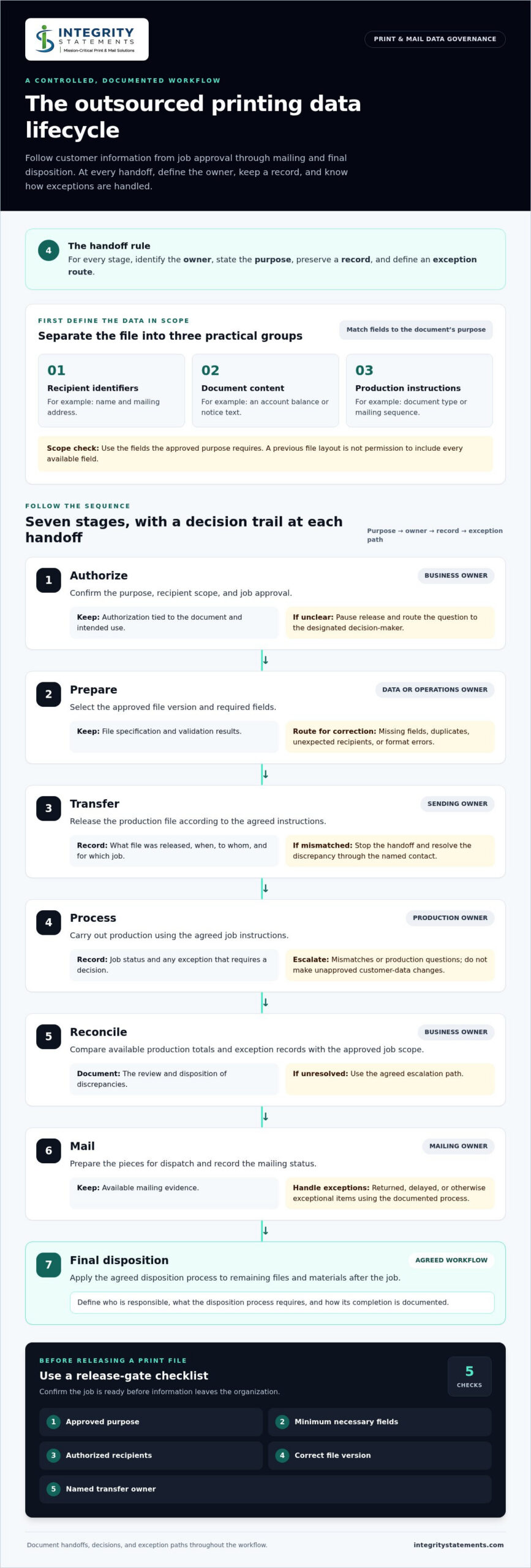
Separate information into three practical groups: recipient identifiers, such as name and address; document content, such as an account balance or notice text; and production instructions, such as document type or mailing sequence. This separation makes it easier to identify what is essential for accurate fulfillment and what may be unnecessary for that job.
Where does customer data move during print and mail fulfillment?
Trace the journey in order: information begins in a source system, is selected for an approved export, and is assembled into a production file. That file is transferred for job processing, then used to create printed pieces. Quality checks compare the output with defined requirements, and mailing preparation organizes pieces for dispatch. After the job, the agreed disposition process addresses remaining files and materials.
At each transition, name the owner, state the purpose, and keep a record of the handoff. For example, the record might identify the approved file version, who released or received it, and whether a correction or exception occurred. The exact record depends on the organization’s process. The key is to define an exception path rather than handle problems through an undocumented workaround.
These details turn outsourcing from a one-time file transfer into a managed workflow. When teams can identify the information in scope, the stage it has reached, and the person accountable for the next decision, they’re better positioned to protect privacy while maintaining accurate, traceable document distribution.
How customer data moves through the outsourced printing lifecycle
A controlled lifecycle makes each decision visible, from permission to use the data through job closeout. In managing customer data for outsourced printing, assign an owner, preserve a record, and define an exception route at every stage. Controls should reflect the information’s sensitivity and the document’s purpose, rather than relying on one uniform process for every job.
- Authorize. The business owner confirms the purpose, recipient scope, and job approval. Keep an authorization record tied to the document and intended use. If approval or scope is unclear, pause release and route the question to the designated decision-maker.
- Prepare. The data or operations owner selects the approved version and fields. Retain the file specification and validation results. Route missing fields, duplicates, unexpected recipients, or format errors for correction before transfer.
- Transfer. The sending owner records what file was released, when, to whom, and for which job. If the recipient, file version, or transfer status doesn’t match the instructions, stop the handoff and resolve the discrepancy through the named contact.
- Process. The production owner follows the agreed job instructions and records job status or any exception requiring a decision. Escalate mismatches or production questions rather than making unapproved changes to customer data.
- Reconcile. The business owner reviews available production totals and exception records against the approved job scope. Document the review and disposition of discrepancies, and route unresolved variances through the agreed escalation path.
- Mail. The mailing owner records the job’s mailing status and available mailing evidence. Address returned, delayed, or otherwise exceptional items using the organization’s documented process. For delivery visibility considerations, see this secure mail tracking guide.
- Dispose. The designated data owner confirms the applicable retention and deletion expectations are documented in policy and agreement. If a hold, audit, or other requirement affects disposition, escalate it before closing the job.
Before transfer: authorize and prepare the production file
Before release, compare the file with the approved document version and job instructions. Check required formatting, missing values, duplicate records, and recipient scope. Keep source data distinct from production instructions so a mailing preference or processing note isn’t mistaken for customer content. The client’s named approver should resolve discrepancies and preserve the decision before the file moves forward.
During and after production: reconcile, track, and close
Reconciliation connects the authorized job to what was processed and mailed. Record production totals, job status, exceptions, corrections, mailing evidence, and escalation decisions as applicable to the workflow. Agree in policy and contract how long files and records are retained and how disposition is handled, subject to applicable requirements. These records help teams review a job without assuming that outsourcing transfers their accountability.
Clear ownership helps keep business-critical statements, invoices, healthcare communications, tax forms, and notices moving through a traceable process. Integrity Statements provides print-and-mail workflows for these document needs.
How to evaluate data controls in an outsourced print workflow
A useful review looks beyond a general promise of security. It asks what the workflow permits, what evidence shows it was followed, and who makes decisions when something goes wrong. This makes managing customer data for outsourced printing easier to assess against the actual document and its purpose, rather than relying on a broad claim that may not explain how a particular job is handled.
Use the same questions across each part of the workflow, then record the answers and any follow-up actions:
- Data scope: Which fields are necessary for the document and delivery, and how is unnecessary information excluded?
- Transfer: Who approves and sends each file? What record identifies the recipient, job, and approved version?
- Access: How are access requests approved, changed, and reviewed? Define the roles that need access and how access decisions are recorded.
- Production: What agreed instructions and records show that the job was processed as authorized?
- Exceptions: Who can pause work, approve a correction, or decide how a discrepancy is resolved?
- Retention: What policy and agreement define how long data and job records are kept and how disposition is handled?
- Incident roles: Who receives an escalation, who coordinates the response, and who has authority to make decisions?
Data minimization and access: what should the workflow allow?
Review each field against its purpose. For an invoice, a recipient’s name, address, and relevant account details may support accurate delivery and document content; unrelated customer fields may not. Confirm who approves access, how changes are recorded, and how permissions are periodically reviewed. Document the expectations alongside the job’s data and handling instructions.
Evidence, incident ownership, and regulatory context
Set responsibilities, escalation contacts, and decision authority before production begins. Evidence can include job records, reconciliation results, and agreed process documentation. Compare these records with what the workflow says should happen. Broad assurances alone don’t establish that a control operated for a specific job. For service context, the statement printing and mailing guide describes the document fulfillment setting these controls support.
Frameworks and laws require careful interpretation. The NIST Cybersecurity Framework can offer a reference for organizing cybersecurity risk discussions, but it isn’t a substitute for assessing the print workflow itself. HIPAA or Texas privacy law may be relevant depending on the organization, data, and arrangement. Have qualified legal or compliance personnel determine applicability and obligations. Treat a certification or report as one piece of evidence by reviewing its scope, period, and relevance to the services and processes in question.
Record gaps as action items with an owner and a due point before relying on the workflow. A concise, documented review makes it easier to revisit controls when document content, recipients, or processing arrangements change.
A practical customer-data checklist before sending print files
A consistent preflight review helps catch file and recipient issues before they reach production. For recurring statements, invoices, and notices, use the same documented checklist each time, then adapt it to the approved purpose and requirements of the specific job. This turns managing customer data for outsourced printing into a repeatable team process rather than a last-minute file review.
What should teams confirm before a print job is released?
Assign a release owner and resolve discrepancies before transferring the file. For billing workflows, the invoice printing and mailing guide offers related context on this type of document fulfillment.
- Authorization and purpose: Confirm the job has approval and the file will be used only for its intended document and mailing purpose.
- Source accuracy: Identify the source system and confirm the data is current under your organization’s process. Decide who can correct source records when details conflict.
- Minimum necessary fields: Compare each field with the document’s content and delivery needs. Remove unrelated customer information rather than carrying it forward by default.
- Recipient scope and count: Check that the intended recipients are included and that the count is consistent with the job request. Investigate unexpected additions, omissions, or duplicates before release.
- Document and file version: Match the production file to the approved document version and instructions. Record the version being sent so teams can distinguish it from drafts or replacement files.
- Transfer ownership: Record who releases the file, the approved transfer route, and the job contact responsible for questions or exceptions.
- Output approval: Confirm what the finished document should contain and which review or approval is required before mailing proceeds.
How should teams handle exceptions and records after mailing?
Decide in advance who investigates a production discrepancy and who can authorize a correction. A mismatch shouldn’t be resolved through an undocumented edit or an informal replacement file. Record the issue, the decision-maker, the approved correction, and the version that proceeds. Keep source-record updates under the authority of the team responsible for that data.
- Returned mail: Assign an owner to review return information and determine whether a customer record should be corrected before a future mailing.
- Reprints: Require a documented reason, approval, and clear identification of the file version used for the replacement job.
- Production variances: Record the discrepancy, investigation, resolution, and any escalation, including when the issue does not result in a reprint.
- Job closure: Retain the agreed job records and apply documented retention and disposition rules consistently. Have legal or compliance staff review requirements that may affect retention or deletion.
Store the checklist with internal procedures and revisit it when the document, recipients, or workflow changes. For business-critical print-and-mail work, review your print-and-mail workflow with Integrity Statements.
How Integrity Statements fits into a governed print-and-mail process
A well-governed print-and-mail process brings the organization’s data rules together with the production steps needed to create and distribute each document. The organization retains responsibility for decisions such as the approved purpose, data fields, recipient scope, and internal authority to release a job. The print partner works from agreed job instructions and manages the production and mailing workflow. Clear roles support accountability without confusing governance ownership with production responsibilities.
Integrity Statements provides business-critical printing and mailing for statements, invoices, healthcare communications, tax forms, regulatory mail, and customer notices. The company has specialized in transactional mail since 1994. For Texas organizations managing customer data for outsourced printing, a practical starting point is to translate internal requirements into clear, documented inputs and handoffs that support accurate document fulfillment.
Align internal data rules with production requirements
For each document type, define which fields are approved, how the production file should be organized, who authorizes its release, and what happens if information is missing or inconsistent. Then align those rules with the job instructions and mailing requirements. A statement workflow, for example, should identify the data needed to match each recipient with the correct statement while keeping unrelated customer information out of the production file.
Document the points where the organization makes decisions and where the print-and-mail workflow carries out those instructions. That distinction helps teams resolve questions without leaving production staff to interpret customer-data policy. Agreed exception steps also give the organization and print partner a common reference when a file needs correction or a job instruction changes.
Plan a clear transition for recurring customer communications
Before moving a recurring job into an outsourced workflow, map its current inputs and dependencies. A practical transition record can capture:
- Document types and purpose: Identify statements, invoices, healthcare communications, tax forms, or notices, along with the reason each is mailed.
- Inputs and volume patterns: Document source systems, approved file fields, expected recipient scope, and how often the organization prepares a job.
- Approvals and owners: Name the people responsible for data accuracy, file release, production questions, and decisions about exceptions.
- Instructions and review points: Record the approved document version, required checks, output expectations, and how corrections are authorized.
- Operational dependencies: Note timing considerations, internal review steps, and any process changes that could affect a recurring mailing.
This transition map gives both teams a stable working reference as recurring communications move through preparation, production, and mailing. It also helps the organization review the process when document content, data inputs, or responsibilities change. Integrity Statements’ print-and-mail workflows support business-critical communications, while the organization’s documented rules continue to guide its data decisions.
If you’re planning or refining a governed workflow for recurring customer communications, discuss your print-and-mail requirements with Integrity Statements.
Make the next print cycle easier to govern
A reliable data process should be easy to repeat and straightforward to revisit when a communication changes. Give each recurring job a simple review point: note what has changed since the last cycle, who approved the change, and whether the production instructions still reflect the organization’s current requirements. This helps teams catch process drift before it becomes a file or fulfillment issue.
Use the next scheduled job to put that approach into practice. Choose one recurring communication, clarify the decisions that belong to your team, and document how those decisions connect to production and mailing. As your workflow becomes clearer, managing customer data for outsourced printing can become a more consistent part of your broader customer-communication process.
Integrity Statements supports business-critical print and mail requirements across statements, invoices, healthcare communications, tax forms, and notices. Discuss your business-critical print and mail requirements and take a practical next step toward a workflow that fits your organization.
Frequently Asked Questions
What customer data should be shared with an outsourced printing provider?
Share only the information needed to create, match, and deliver the specific document. A statement may require a customer name, mailing address, account reference, and statement details, while unrelated profile fields may have no production purpose. Before sending a file, compare its columns with the approved job specification. Avoid including passwords, internal notes, or extra records simply because they’re present in a source-system export.
Is customer data safe when a business outsources printing and mailing?
It can be handled responsibly, but outsourcing alone doesn’t establish that data is safe. Protection depends on the safeguards, procedures, responsibilities, and oversight that apply to the particular workflow. Review documented evidence for the process involved, including how files are handled, exceptions escalated, and job records maintained. Don’t treat a broad security statement or a single certification as proof that every data risk is addressed.
How can a company reduce customer data exposure in print production?
Start by removing fields that aren’t needed for the document, then limit the number of working copies and people who handle them. Use a non-customer test file when checking layout or formatting, rather than duplicating live records for convenience. Keep approved instructions separate from customer content, and make sure obsolete versions aren’t mistaken for the release file. These steps reduce unnecessary exposure without changing the communication’s purpose.
Who is responsible for customer data when printing is outsourced?
Responsibilities depend on the agreement, each party’s role, and applicable law, but outsourcing doesn’t automatically remove the organization’s responsibility for its data decisions. The organization should define who approves the purpose, fields, and recipients; the provider should understand its assigned production responsibilities. For Texas organizations, have legal or compliance staff assess relevant state and other applicable requirements rather than assuming one rule covers every mailing.
What should a print-and-mail data processing agreement cover?
An agreement should describe the permitted processing purpose, data involved, and instructions governing the work. It should also define each party’s responsibilities, applicable safeguards, incident escalation and notification process, support for relevant data requests, retention and disposition expectations, and what evidence may be shared for review. Address subcontractors or changes to the workflow where relevant. Legal and privacy teams should tailor terms to the relationship and applicable obligations.
How long should customer data be retained after a print job?
There’s no single retention period that fits every print job. Set a schedule based on the purpose of keeping each item, organizational policy, contractual terms, and any applicable legal or operational requirements. Distinguish production files from records needed to document job completion or resolve disputes, since their purposes may differ. Have legal or compliance staff review the schedule, including any holds, before data is deleted or otherwise disposed of.
Does HIPAA apply to outsourced healthcare printing and mailing?
HIPAA may apply depending on the organizations involved, the information handled, and the provider’s role in the arrangement. Healthcare communications can involve protected health information, but the document category alone doesn’t determine every party’s obligations. Ask your privacy or legal team to assess applicability and required agreements, including whether a business associate arrangement is necessary. Document the approved handling instructions before sending files for healthcare-related print production.
What happens if customer data is sent incorrectly for a print job?
Act promptly: alert the designated job contact and your internal privacy or incident lead, and ask whether production or mailing has begun. Follow the established process to stop or correct the job where possible, assess what information and recipients are affected, and preserve relevant records. Escalate decisions through the assigned authority. Any notification or reporting steps should follow your incident plan and be reviewed against applicable legal requirements.


